Personal learning & the limits behind free AI study

Grasply vs Knowt

Free study tools and free AI processing are different things. Compare how each app handles your own files, what its allowances cover, and whether you learn mainly from class resources or your own growing collection.

Try your next topic in Grasply.

Free mobile app · No paywall · Up to 30 flashcards per topic

Choose Grasply for…

Choose Grasply if you want to bring personal books, notes, and recordings into a Library, create quizzes without a subscription paywall, and keep learning through Remember and Explore.

Choose Knowt for…

Choose Knowt if its school resources, shared materials, and class study workflows fit your course. It also creates AI flashcards; access to processing your own files depends on your account and plan.[1][2][3][4]

What you get, and where the limits are.

Compare the features you will actually use. Free study access, AI processing allowances, and the number of cards in a session are different measures.

Free access and feature comparison, reviewed September 11, 2026
What mattersGrasplyKnowt
Free accessFree to use with no paywall. Generate up to 30 flashcards per topic; this is a per-topic card count, not a promise of unlimited usage.A free Basic student plan includes file creation, collaboration, storage, and access to resources. AI processing has separate allowances; free does not mean every AI feature is unrestricted.[1][3]
AI processing limitsGenerate up to 30 flashcards per topic for free. This card count should not be compared directly with a monthly file-processing allowance.The AI Summarizers guide currently lists one AI summary per month for free students. Teacher-shared materials have different rules. Check Your Plan for the allowance on your account.[2][3]
InputsCreate from prompts, PDFs, notes, books, images, or audio. Choose the web or your saved Library as the source.AI Summarizers support PDFs, images, video, PowerPoint, and live recordings, with output as notes or flashcards.[2]
Create & edit cardsLearn, Test, or Discover with Yes / No, four-option multiple choice, and fill-in-the-blank questions.Kai can generate cards from a prompt and help edit, regenerate, or expand selected cards.[4]
Chat & audio toolsChat with saved material, transcribe your recordings, and listen to flashcard content.Kai chat, calls, podcasts, and AI summaries are documented tools. Usage on your own files and teacher-shared files is treated differently.[2][3]
Return to learningRemember Mode revisits selected material, missed cards, and weak concepts. Explore Mode follows connected topics.Continue with saved notes or sets, practice tests, and Knowt Play. Your plan determines access to some AI actions.[2][3]

On a small screen, scroll the table sideways. Sources describe the plans and platforms available on the review date; check the linked details before choosing.

From your first source to your next review.

The app you keep using is the one that fits the way you collect, study, and return to knowledge.

Capture, organize, generate, study, and revisit
Your next stepIn GrasplyIn Knowt
1. CaptureRecord a lecture or add your own notes, PDF, or book scan.Select the input type and upload files or add a supported link.[2]
2. OrganizeKeep the source and transcript in a Library folder with your other material.Keep created notes and sets alongside your study resources.[2][1]
3. GenerateCreate a focused quiz from the saved material or a new topic.Choose notes or flashcards, set output preferences, and process the source within your allowance.[2]
4. StudyAnswer mixed quiz formats and open explanations.Use generated material for a practice test, chat, or Knowt Play.[2]
5. RevisitBring older material into Remember or start a connected Explore session.Return to your saved study materials and available activities.[2]

How you might use Grasply

Two examples, starting with your own material.

Exams & coursework

Make a lecture recording useful before the exam

Start with: A recorded class and the notes you took alongside it.

  1. Upload the recording, transcribe it, and save the transcript.
  2. Ask about a difficult section and generate questions from the source.
  3. Revisit missed concepts alongside the related notes.

Compare the allowance for processing your own recording, especially if you use AI for several classes.

Everyday learning

Follow a history question into connected ideas

Start with: Your notes about the Cold War and a question about diplomacy.

  1. Save the notes so you can return to the original material.
  2. Use Remember to revisit the concepts you have already studied.
  3. Start Explore with a connected question and follow what interests you.

A learning routine that can continue beyond a course or exam.

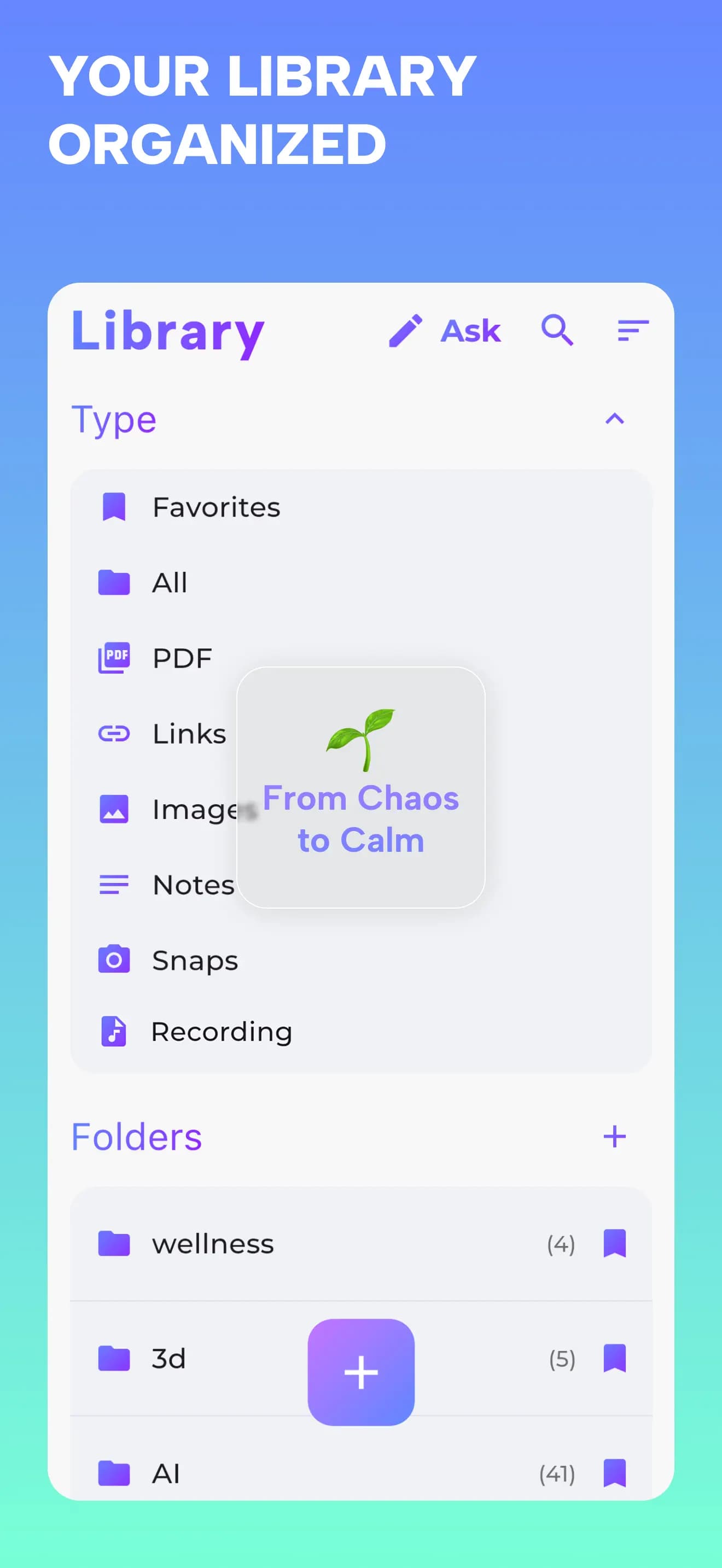
Grasply Library organizing PDFs, links, images, notes, scans and recordings into folders
Keep recordings, notes, and reading in one collection.
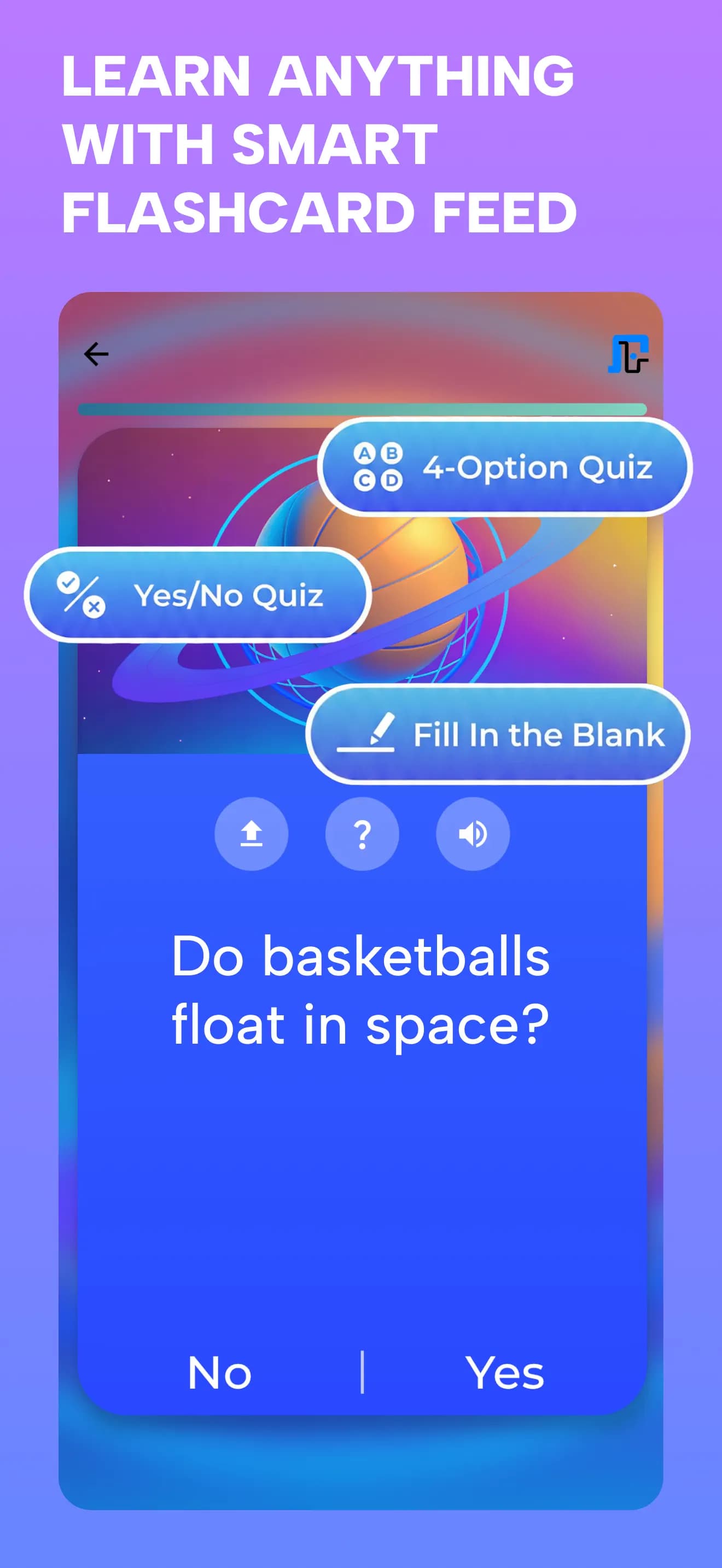
A visual flashcard feed with yes-or-no, multiple-choice and fill-in-the-blank quizzes
Return to learning through a personal flashcard feed.

Actual Grasply iPhone screens. Example workflows describe ways to use your own sources.

Try your next topic in Grasply.

Free mobile app · No paywall · Up to 30 flashcards per topic

Before you choose.

Does Knowt create flashcards with AI?

Yes. Its summarizers can output flashcards, and Kai can help generate or edit sets. Compare the input types and allowances you need rather than treating AI as exclusive to either app.[2][4]

Why distinguish personal files from teacher-shared material?

Knowt documents different usage treatment for AI on your own files and materials shared by a teacher in a class. Check the rules that match how you actually study.[3]

Can I switch without moving every existing set?

Yes. Try one original lecture recording, PDF, or set of notes in Grasply first. Generate a new quiz and see whether the Library and Feed fit your routine. This is not a direct Knowt set-import workflow.

Is Grasply free, and what does the 30-card limit mean?

Free to use with no paywall. Generate up to 30 flashcards per topic; this is a per-topic card count, not a promise of unlimited usage.

Can I study in another language?

Grasply supports learning content in more than 20 languages, including bilingual sessions and audio playback. This describes study content, not a promise that every app menu is translated.

What works offline?

Saved Library material remains available offline. AI generation, transcription, chat, and web-backed features need a connection. Library synchronization is supported between iPhone and iPad.

Can I start with my own material instead of a web topic?

Yes. Save a PDF, note, image, book scan, or recording in your Library and choose that material as the source for a quiz. Review the explanation and check important answers against your source.

Sources & review notes.

This comparison is published by Grasply. Competitor details come from the official sources below, reviewed on September 11, 2026. This is a documented feature comparison, not a timed performance test or a claim that one app is best for everyone.

  1. Knowt: student plans and study resources
  2. Knowt: AI summarizers and the free student allowance
  3. Knowt: AI usage and teacher-shared materials
  4. Knowt: creating and editing flashcards with Kai

Grasply feature references: features, Daily Learning Feed, and Second Brain Library.

Try Grasply with something you care about.

Bring one set of notes, a book passage, or a recording. Make a quiz and see whether the experience suits you.

Try your next topic in Grasply.

Free mobile app · No paywall · Up to 30 flashcards per topic